
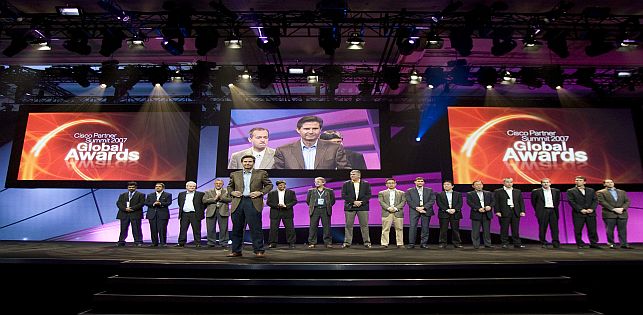
Image Magnification
When attendees cannot clearly see a speaker, demonstration, award presentation, or panelist from their seats, they gradually disconnect from the program. Image magnification solves this problem by capturing live camera images and displaying them on projection screens, LED walls, or large-format monitors throughout the venue.
Often called IMAG, image magnification is commonly used at conferences, conventions, corporate meetings, galas, concerts, religious programs, graduations, product launches, and other events with large rooms or substantial audiences. It allows guests seated far from the stage to see facial expressions, presentation details, products, demonstrations, and important onstage moments in real time.
Show Technology Inc. provides professional image magnification systems, cameras, video switching, projection, LED video walls, staging integration, lighting, and technical operation for events in Miami, throughout South Florida, and at additional locations based on project requirements.
What Is Image Magnification?
Image magnification is the live display of camera images on one or more event screens. A camera captures the presenter, performer, panel, demonstration, or audience activity. The signal is then routed through a video-production system and displayed on screens that are visible throughout the room.
IMAG is not simply a camera connected directly to a television. Professional image magnification may involve several cameras, long-range lenses, video switching, presentation playback, graphics, signal distribution, recording, and a crew coordinating each visual transition.
The objective is to give every attendee a useful view without distracting from the live stage. Guests should be able to alternate naturally between watching the speaker and viewing a close-up on the screen.
When Does an Event Need IMAG?
There is no single attendance threshold that determines whether image magnification is necessary. Room depth, stage height, seating orientation, ceiling height, columns, screen placement, and the type of program all affect visibility.
IMAG should be considered when:
- Guests in the rear half of the venue cannot see a presenter’s face clearly
- The room is long, wide, or divided by columns
- The event includes detailed demonstrations or physical products
- Facial expressions are important to the audience experience
- A panel includes several speakers seated across a wide stage
- Awards, performances, or ceremonial moments must be visible to everyone
- The program is already being recorded or livestreamed
- Overflow rooms need access to the main-stage program
- Sponsors expect prominent visual exposure
Image magnification can be integrated with Show Technology’s professional audio-visual production services, allowing cameras, sound, presentations, lighting, displays, and technical staffing to operate as one production system.
IMAG Is Different From Showing Presentation Slides
Presentation support and image magnification are related but distinct. Presentation screens show slides, videos, charts, sponsor graphics, and other prepared content. IMAG shows live camera images of what is happening in the room.
Many events need both. A keynote presentation may display the speaker on one screen and slides on another. A wide LED wall may use a custom layout with the presentation in the center and live camera images positioned on the sides. During a panel, the display may alternate between full-screen camera shots and supporting graphics.
The display strategy should be determined before content is designed. Presenters need to know whether slides will appear full-screen, beside a camera image, or within a branded layout. This affects font size, image placement, aspect ratio, and the amount of information that can remain readable.
Choosing the Right Camera Configuration
The number of cameras should reflect the complexity of the program and the quality expected from the finished visual experience.
Single-Camera IMAG
A single operated camera may be appropriate for a straightforward keynote, lecture, ceremony, or presentation with limited movement. The operator can follow the active speaker and adjust framing as needed. The limitation is that there is no alternate camera angle available while the operator reframes or when something blocks the shot.
Two-Camera IMAG
A two-camera system provides greater flexibility. One camera can maintain a safe wide shot while the second captures close-ups. The video director can switch between them, hiding camera adjustments and creating smoother visual pacing.
Three or More Cameras
Larger productions may use separate cameras for wide stage coverage, presenter close-ups, panelists, demonstrations, audience reactions, and roaming shots. This approach is useful for conferences, awards programs, concerts, religious events, and programs that will also be recorded or livestreamed.
Camera locations should be selected early. Operators need clear sightlines, sufficient working space, stable platforms where necessary, and cable routes that do not interfere with guests.
Why Camera Lenses and Placement Matter
A camera positioned at the rear of a large ballroom needs a lens capable of capturing close views across a substantial distance. A camera with the wrong lens may produce a wide image when the audience needs to see the presenter’s expression.
Placement also affects how the speaker appears. Cameras positioned too low may create an unflattering upward angle. Cameras placed far to one side can make speakers appear to look away from the audience whenever they address the room.
Whenever possible, the primary camera should be positioned near the audience’s natural viewing axis and elevated enough to see over seated or standing guests. The stage, screens, lighting, and camera platforms should therefore be planned together through coordinated event staging and set design.
Selecting Screens for Image Magnification
IMAG can be displayed through projection screens, LED video walls, or professional monitors. The best option depends on the venue, audience size, available space, ambient light, viewing distance, and creative design.
Projection Screens
Projection is effective in ballrooms, conference rooms, theaters, and other indoor spaces where ambient light can be controlled. The production plan must provide adequate projector brightness, suitable screen size, clear projection paths, and positions where guests will not block the image.
LED Video Walls
LED walls provide bright images and flexible dimensions. They work well for premium corporate events, large conferences, concerts, awards programs, product launches, and venues where daylight or room lighting makes projection difficult.
A main LED wall may carry presentation content while additional side screens display IMAG. Alternatively, one wide wall can combine live cameras, branding, slides, and motion graphics in a designed layout.
Show Technology’s LED walls and video display solutions include setup, video switching, playback, signal support, and on-site operation for live event visuals.
Large-Format Monitors
Professional displays may be suitable for smaller rooms, breakout sessions, overflow spaces, backstage monitoring, or locations where projection and LED walls are impractical.
Screen Placement and Audience Sightlines
A large screen is not useful if it is positioned too low, blocked by décor, or difficult to view from part of the room. Screen placement should be evaluated from the first row, rear seating, side sections, camera positions, and any overflow areas.
Side screens are often placed on both sides of the stage so attendees can view the closest display without turning excessively. In very wide or deep venues, delay screens may be installed farther into the audience area.
The bottom of each screen should remain above normal sightline obstructions. Stage height, scenic elements, floral arrangements, speakers, truss, and room architecture must all be considered before final placement is approved.
Video Switching Creates a Finished Program
A video switcher allows the director to select what appears on each screen. Sources may include cameras, presentation computers, video playback systems, remote speakers, graphics, and sponsor content.
The director can move from a wide shot to a close-up, cut to presentation slides, show a demonstration, or display an event graphic during transitions. These choices should support the program rather than call attention to the technology.
Complex events may require different outputs. The room screens might show IMAG, while confidence monitors show the next slide and the livestream receives a branded combination of cameras and presentations. A properly designed switching system can manage these destinations independently.
Lighting Is Essential for Professional IMAG
Cameras require intentional stage lighting. A presenter who appears adequately illuminated to the audience may look dark, uneven, or discolored on screen. Decorative uplighting and ballroom chandeliers rarely provide sufficient facial light for professional video.
Camera-friendly lighting generally includes even front light, controlled backlight, consistent color temperature, and enough intensity to produce a clean image. The design should avoid deep facial shadows, excessive glare, and bright scenic elements that compete with the speaker.
Presenters should be able to move naturally within the defined stage area without entering dark zones. Panels require a broad, even lighting wash so every participant remains visible.
Show Technology’s event lighting design and production can be coordinated with camera positions, display brightness, stage scenery, photography, and recording requirements.
IMAG for Panels, Awards, and Demonstrations
Different program formats require different camera strategies.
For panel discussions, operators need to identify the active speaker quickly without producing abrupt or distracting camera movement. A wide safety shot can cover the full panel while another camera captures individual close-ups.
Awards programs often require coverage of the presenter, recipient, trophy handoff, handshake, and stage exit. Separate entry and exit routes make these moments easier to capture.
Demonstrations may need an overhead camera, close-detail camera, document camera, or dedicated product view. The production team should understand exactly what the audience must see before selecting equipment and mounting positions.
Combining IMAG With Recording and Livestreaming
The same camera system used for image magnification can often support recording and livestreaming, but each output has different needs.
Room screens may favor tight close-ups because attendees can already see the overall stage. A livestream also needs wide establishing shots, presentation feeds, graphics, remote participants, and transitions that make sense to viewers who are not physically present.
A recording may require isolated camera files, presentation captures, and separate audio tracks for editing. These requirements should be established before the event so the system includes suitable recorders, storage, routing, and crew.
Show Technology’s hybrid and virtual event solutions can integrate IMAG with streaming platforms, multi-camera switching, remote speakers, audio routing, and event recording.
Audio and Video Must Remain Synchronized
Video processing can introduce a small delay between the live speaker and the image shown on screen. In many venues this is minor, but complex processing, long signal paths, streaming systems, or multiple display types may make the delay noticeable.
The production team should test the complete signal path and account for synchronization where necessary. Audio, camera switching, video playback, and display processing must be evaluated together rather than as independent systems.
Rehearsal Improves Camera Coverage
A rehearsal gives camera operators and the video director an opportunity to learn the program. They can identify where each presenter will stand, how panelists are seated, when demonstrations occur, and where awards will be presented.
Marking primary presenter positions helps both lighting and camera teams maintain consistent coverage. The run of show should identify speaker names, stage entrances, presentation cues, videos, remote contributors, and special moments.
Show Technology’s event consultation and technical support can help review venue conditions, camera requirements, technical schedules, display placement, and rehearsal needs before the audience arrives.
Common Image Magnification Mistakes
Several planning errors can reduce the effectiveness of an IMAG system:
- Adding cameras after the room layout is already finalized
- Placing screens too low for rear attendees
- Using decorative lighting without proper facial illumination
- Blocking camera sightlines with tables, décor, or standing guests
- Providing too few camera angles for a fast-moving program
- Ignoring presentation aspect ratios and screen dimensions
- Failing to schedule a technical rehearsal
- Operating cameras without a director or clear shot assignments
- Assuming a livestream recording will automatically meet post-event editing needs
- Allowing last-minute stage changes without informing video operators
Information Needed for an IMAG Quote
Provide the following details when requesting image magnification services:
- Event date, venue, room, and schedule
- Audience size and seating configuration
- Room dimensions and stage location
- Program type and preliminary run of show
- Number of presenters, panelists, or performers
- Existing screens or proposed display requirements
- Presentation, graphics, and video playback needs
- Recording and livestream requirements
- Venue lighting, rigging, power, and access restrictions
- Setup, testing, rehearsal, and breakdown times
Floor plans, venue photographs, stage renderings, and examples of the desired screen layout can help the production team recommend appropriate cameras, lenses, displays, operators, and signal infrastructure.
Frequently Asked Questions About Image Magnification
Is IMAG only for very large events?
No. Image magnification is useful whenever room depth, seating layout, demonstrations, or stage details make it difficult for attendees to see clearly. A medium-sized event in a long ballroom may benefit from IMAG more than a larger event in a compact theater.
Can IMAG and presentation slides appear at the same time?
Yes. Different screens can display separate sources, or a designed layout can combine a camera image with slides, branding, captions, or sponsor graphics.
Can the camera feed be recorded?
Yes. The switched program and individual camera sources may be recorded depending on the production plan and required deliverables.
How many cameras are required?
The camera count depends on the program. A simple keynote may use one or two cameras, while panels, awards, entertainment, demonstrations, and broadcast-quality productions may require several.
Does Show Technology provide camera operators and video technicians?
Yes. Technical staffing can include camera operators, video directors, playback technicians, display engineers, streaming technicians, audio engineers, and other production personnel based on the event.
Request Image Magnification for Your Event
Effective image magnification helps every attendee feel closer to the program. It improves visibility, supports engagement, and creates a camera system that may also serve recording, livestreaming, overflow-room, and post-event content requirements.
Show Technology Inc. provides IMAG, professional cameras, video switching, projection, LED walls, stage lighting, audio systems, recording, and technical event production. Our team supports corporate meetings, conferences, conventions, galas, performances, and live events throughout South Florida and beyond.
For broader planning guidance, review our corporate event production guide. To discuss your room, audience, screens, camera coverage, and production schedule, request an audio-visual production quote.
