
Skip links
Pro Playback System Rental, Professional Video Playback Recording

Video Playback Recording

Video playback and recording are highly visible parts of live event production. A video that freezes, plays without sound, appears in the wrong aspect ratio, or starts late can interrupt an otherwise polished program. A recording that misses presentation slides or contains unusable audio may leave an organization without the training, marketing, or archival content it expected.

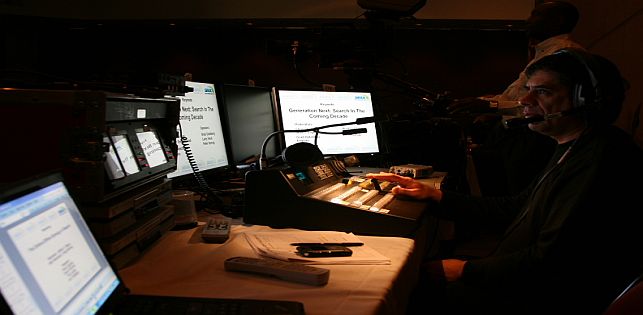
Show Technology Inc. provides professional video playback, event recording, presentation support, video switching, display systems, and on-site operation for conferences, corporate meetings, galas, training programs, panels, performances, and hybrid events. The goal is to deliver the correct content to the correct screens, speakers, recorders, and remote audiences at the correct moment.

What Is Professional Video Playback?

Professional video playback is the controlled delivery of prerecorded media during a live event. This may include opening videos, sponsor reels, speaker introductions, commercials, award packages, product demonstrations, music videos, animated backgrounds, countdowns, walk-in loops, memorial tributes, or closing content.

Unlike casual playback from a personal laptop, a production system is prepared around the event’s resolution, screen layout, audio routing, cue sequence, and backup plan. A technician verifies each file, organizes content in show order, and triggers it according to the run of show.

Playback may feed a projector, confidence monitor, livestream, recorder, or one or more LED walls and professional video displays. Some events require the same image everywhere; others require different content on main screens, presenter monitors, lobby displays, and the online program.

Why Pressing Play Is Not a Complete Production Plan

Video files arrive in many resolutions, codecs, frame rates, aspect ratios, and audio configurations. Two files with the same extension may behave differently because of their encoding. A video that works on one computer may fail or produce no audio through the event system.

Playback must coordinate with lighting, microphones, cameras, presenters, and stage movement. When an introduction ends, lighting may change, a microphone may open, and the camera director may take a live shot. These transitions should be rehearsed as production cues.

Show Technology’s audio-visual production services can combine playback with sound reinforcement, presentation switching, displays, lighting, staging, and technical staffing so each department follows the same program.

What a Video Playback System May Include

The system depends on the event’s scale and the consequences of a failure. A professional configuration may include:

  • Dedicated playback computers rather than presenters’ personal devices
  • Video playback and presentation software
  • Primary and backup media files
  • Video switchers, scalers, converters, and distribution equipment
  • Audio interfaces or embedded audio routing
  • Preview monitors for the operator
  • Confidence monitors for presenters
  • Signal feeds for projection, LED walls, livestreams, and recording
  • Backup computers and redundant signal paths
  • An on-site playback or presentation technician

A smaller meeting may use a streamlined system. A high-value general session, awards program, product launch, or broadcast may require synchronized playback, multiple outputs, graphics, redundant machines, and separate operators.

How to Prepare Video Files for an Event

Content preparation is one of the most effective ways to prevent show-day problems. Ask the production team for delivery specifications before editors export final files. The specifications may address resolution, aspect ratio, frame rate, codec, file container, audio format, and naming conventions.

Provide final videos several days before the program—not from a phone or cloud link while guests are entering. Early delivery allows technicians to inspect files, test audio, identify incomplete media, and convert content when necessary.

Each filename should identify its place in the program. “Final_Final_v7.mp4” is less useful than “03_CEO_Introduction_1080p.mp4.” A cue sheet should state when the video begins, whether it includes audio, and whether the screen should hold, fade, or change sources when it ends.

Keep Local Copies

Critical content should be stored locally before the event. Streaming from YouTube, email, or cloud storage introduces dependence on internet access, permissions, advertising, and buffering. Online sources should not be the only copy when usage rights permit local playback.

Design for the Actual Display

A standard 16:9 video may not fill an ultra-wide LED wall. Stretching it can distort people, logos, and text. Confirm the exact pixel dimensions before graphics are created so content can be resized, cropped, or placed within a branded layout.

Audio Routing for Video Playback

A video can appear correctly while its sound fails because visual and audio signals follow different paths through the production system. Playback audio may need to reach the room loudspeakers, livestream, recording, press feed, backstage monitors, or interpretation system. Those destinations may require different levels or mixes.

The audio engineer should test every playback file. Speech must remain intelligible, music should not overpower the room, and level changes between videos should be corrected. The operator and engineer should also coordinate transitions into live remarks.

What Is Event Video Recording?

Event recording captures the audio and visual content of a live program for future use. The recording may document a keynote, training session, panel, awards ceremony, performance, town hall, fundraiser, product presentation, or complete conference.

Recording can range from one camera with a clean audio feed to a multi-camera production combining presenters, slides, graphics, and remote speakers. The correct approach depends on whether the deliverable is archival, educational, promotional, or broadcast-ready.

Define the Deliverable Before Selecting Cameras

“Record the event” does not provide enough information for an accurate production plan. Before equipment is selected, identify who will watch the finished content, where it will be distributed, how quickly it is needed, and how polished it must look.

Possible deliverables include:

  • A complete recording of each session
  • An edited keynote or panel discussion
  • A clean recording with slides inserted
  • Separate camera and presentation files
  • Individual audio tracks for later editing
  • Short clips for social media
  • Executive interviews or testimonials
  • A promotional event recap
  • An internal training archive
  • A livestream recording for on-demand viewing

Deliverables determine the camera count, operator positions, audio feeds, lighting, storage, editing time, and file-transfer method. One wide camera may document the room but will not provide enough variety for a dynamic highlight film.

Recording Presentations and Slides Clearly

Pointing a camera at a projection screen is rarely the best way to record presentation content. The screen may appear overexposed, flicker, change color, or become unreadable. A stronger workflow sends the presentation directly into the recording system while cameras capture the presenter and audience.

A video switcher can create a live program moving between the speaker, slides, videos, and other sources. Recording sources separately gives editors more flexibility and can protect against a poor live cut.

Audio Quality Is More Important Than Camera Count

A recording with a beautiful image and unclear speech has limited value. Camera microphones placed at the back of a ballroom usually capture echo, HVAC noise, audience movement, and distant voices. Professional recordings should receive a direct feed from the event’s audio system whenever possible.

The recording plan should cover presenters, panelists, audience questions, playback audio, remote speakers, and music. Isolated microphone channels can help an editor repair level differences or remove unwanted sources later.

Multi-Camera Recording and Live Switching

Multi-camera coverage creates a more engaging program and protects against blocked or repetitive angles. A conference configuration may include a wide stage view, a close presenter shot, and a camera for panels or audience questions.

A video director can switch among cameras, slides, videos, and graphics. The program may feed room screens, a livestream, and the primary recording simultaneously, while individual cameras are preserved for editing.

Events connecting remote viewers or speakers can use Show Technology’s hybrid and virtual event solutions to coordinate camera feeds, platform audio, playback, livestreaming, remote contributions, and recording.

Redundancy for Playback and Recording

Critical content should not depend on one computer, one cable, or one recording device. The level of redundancy should reflect the event’s value, audience, and tolerance for interruption.

A redundancy plan may include duplicate media on separate computers, backup adapters, alternate signal routes, redundant recordings, locally stored presentations, and backup power. Operators should know how to change sources without a long interruption.

Recording redundancy matters because a problem may not be obvious during the program. A secondary recording or isolated camera capture can preserve content if the primary file fails.

Rehearsal and Run-of-Show Coordination

A technical rehearsal should confirm the file, audio level, destination screens, transition cues, lighting state, presenter entrance, microphone handoff, and next source. Include remote speakers and livestream destinations when relevant.

The run of show should identify every playback cue, including filename, duration, screen destination, audio status, start condition, and following action. Send replacement files to one designated production contact to prevent conflicting versions.

Show Technology’s event consultation and technical support can help organize media, review technical requirements, develop cueing procedures, and identify backup needs before doors open.

Permissions, Privacy, and Content Ownership

Organizations should determine whether speakers, performers, attendees, or licensed media may be recorded and redistributed. Music, commercial videos, presentation images, and remote-platform recordings may have usage restrictions. Private meetings may contain confidential information.

Before the event, define who owns the footage, who may access it, whether attendee notices are required, and where content will be published. The organizer should resolve permissions and distribution rights.

Questions to Answer When Requesting a Quote

Provide the following information for a useful playback and recording proposal:

  • Event date, venue, room, and complete schedule
  • Audience size and event format
  • Number and type of displays
  • Approximate number of videos and presentations
  • Screen resolution or LED-wall dimensions
  • Camera coverage and livestream requirements
  • Number of speakers, panelists, and audience microphones
  • Required recording deliverables
  • Editing, captioning, graphics, and delivery deadlines
  • Content privacy and file-transfer requirements
  • Setup, testing, rehearsal, and breakdown times

For broader guidance on integrating playback and recording with sound, staging, lighting, LED walls, and staffing, review Show Technology’s corporate event production guide.

Frequently Asked Questions

Can Show Technology play videos and presentations during the same event?

Yes. Videos, slide presentations, graphics, camera feeds, and remote speakers can be routed through a coordinated switching and display system.

Can you record the presenter and slides together?

Yes. The final program can combine camera images with direct presentation feeds. Separate recordings may also be created when the production requires additional editing flexibility.

Can the event be recorded without livestreaming it?

Yes. Recording and livestreaming are separate services. An event can be captured for private delivery or later publication without being broadcast live.

Do you provide an on-site playback operator?

Yes. Technical staffing can include playback, presentation, video switching, camera, audio, streaming, and recording personnel based on the event’s complexity.

Request Video Playback and Recording Services

Reliable playback and useful recordings begin with advance preparation, clear cueing, proper audio routing, suitable display and camera systems, and technicians who understand the program.

Show Technology Inc. provides video playback, event recording, presentation support, switching, LED displays, audio systems, livestreaming, and technical production in Miami, throughout South Florida, and at additional locations based on project requirements.

To discuss an upcoming conference, training program, corporate meeting, gala, awards event, panel, performance, or hybrid production, request an AV production quote. Include your event schedule, venue, display requirements, media count, recording goals, and delivery deadline so the team can recommend an appropriate workflow.

Leave a comment

Explore
Drag